LAB: Adding Style Guides

A focused workshop for working developers who need to use AI right now, in real projects, under real time pressure.
This is where we being to address the "crap code" problem when it comes to AI code generation. Spend any time on social media, and you'll see people lamenting how AI is failing them:
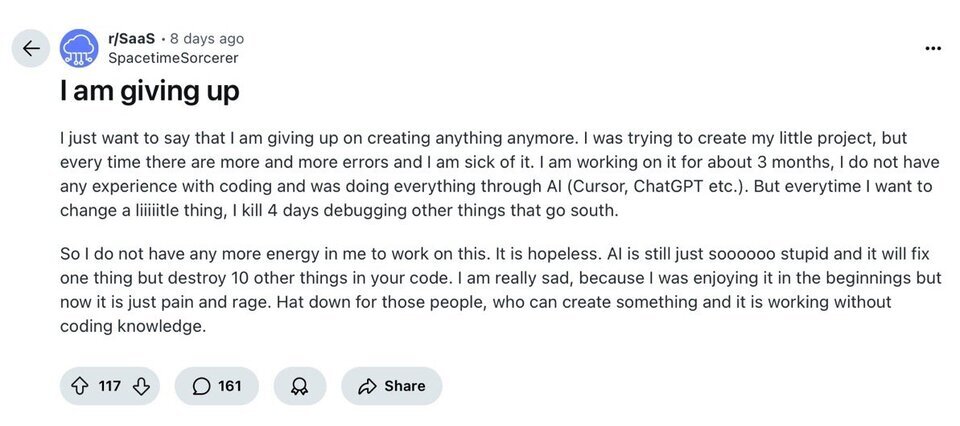
Of course, this is an extreme case and this poor person is trying to code without understanding how code works, which is where we'll start this lab.
Understanding What You're Doing
It's imperative that you don't try to get AI to do something that you can't already do yourself. It's OK to use AI to learn new things, of course, but you should also be sure you have someone to talk to or at least some resource available to you so that you don't get led down the wrong path.
As we've seen: AI will do what you ask it to, even if it's completely wrong. Just like the README problem a few labs ago. Claude Sonnet (using Copilot) tried to make us look good, so invented a lot of things about our project. We know this is a bad thing, so we were able to course correct to avoid a problem
In the same way: you should be able to spot "crap code" or wrong solutions when you review what the LLM has created for you. You should also be able to tell AI more specifically what you want, to avoid these problems, also called "hallucinations".
That's what this lab is all about.
Step 1: Adding a Database Style Guide
In our last lab we created some SQL from a specification written in markdown. It was pretty good, but if you work in a larger company, you probably have a DBA who is going to yell at you:
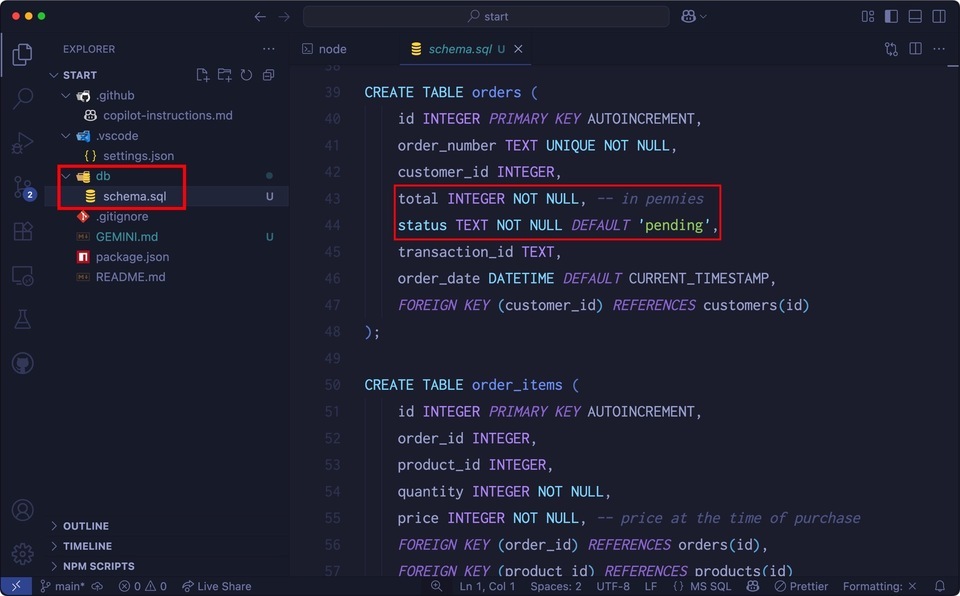
It's not bad necessarily, but it might not follow your company standards.
For instance:
- You might want
created_atandupdated_atfields. - The
transaction_idfield isTEXTbut fields ending in_idare usuallyinteger. - There are no
CHECKconstraints aside fromNULLandUNIQUE.
And then there's this table:
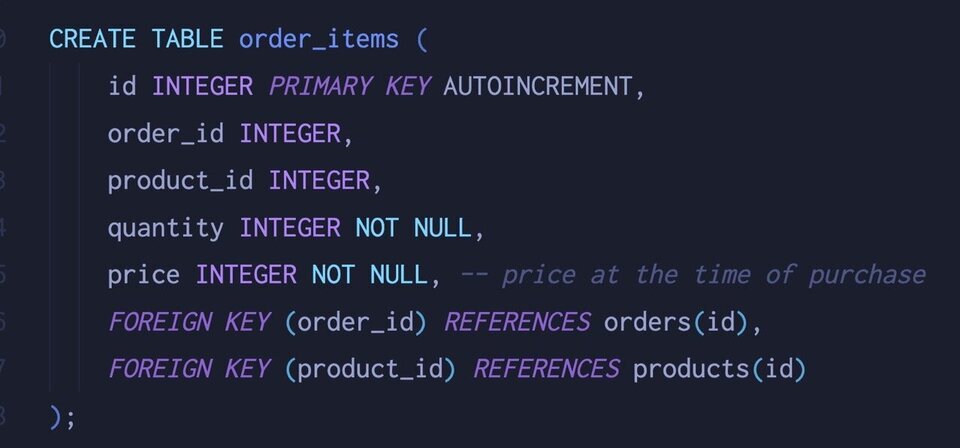
The order_items table is a "many to many" join table, but there's nothing here to enforce that relationship. You could have the two of the same product, for instance, in the same order.
Let's see if we can fix this issue with some database standards. Add the following to GEMINI.md:
<span class="hljs-section">## Database Style Guide</span>

<span class="hljs-bullet"> -</span> All SQL files (.sql), database files (.db, .sqlite) will live in the <span class="hljs-code">`/db`</span> directory.
<span class="hljs-bullet"> -</span> SQLite will be used for development and stored at <span class="hljs-code">`/db/dev.db`</span>
<span class="hljs-bullet"> -</span> SQLite in-memory will be used for testing and build.
<span class="hljs-bullet"> -</span> PostgreSQL will be used for production.
<span class="hljs-bullet"> -</span> All ORM models will live in the <span class="hljs-code">`/db/models`</span> directory.
<span class="hljs-bullet"> -</span> Database tables will be lower cased using underscores.
<span class="hljs-bullet"> -</span> Every table will have an auto increment integer primary key called <span class="hljs-code">`id`</span>.
<span class="hljs-bullet"> -</span> <span class="hljs-code">`char`</span>, <span class="hljs-code">`varchar`</span> and <span class="hljs-code">`nvarchar`</span> are never to be used for string fields, only <span class="hljs-code">`text`</span>.
<span class="hljs-bullet"> -</span> Every table should have <span class="hljs-code">`created_at`</span> and <span class="hljs-code">`updated_at`</span> timestamps.
<span class="hljs-bullet"> -</span> Many to Many relationships (tables with more than one foreign key) will have compound primary keys, never a single ID with compound unique.
Now, let's ask Gemini to refactor things for us:
refactor @db/schema.sql and @db/test<span class="hljs-emphasis">_data.sql based on the
updated instructions in GEMINI.md</span>
When working with Gemini CLI, you can specify files to use in the chat request by prepending the @ symbol, as we've done here. This also means we could have put the database styles on its own in a docs/styles directory, and then referenced it here in the prompt instead of specifying GEMINI.md
OK, let's see what we get back!
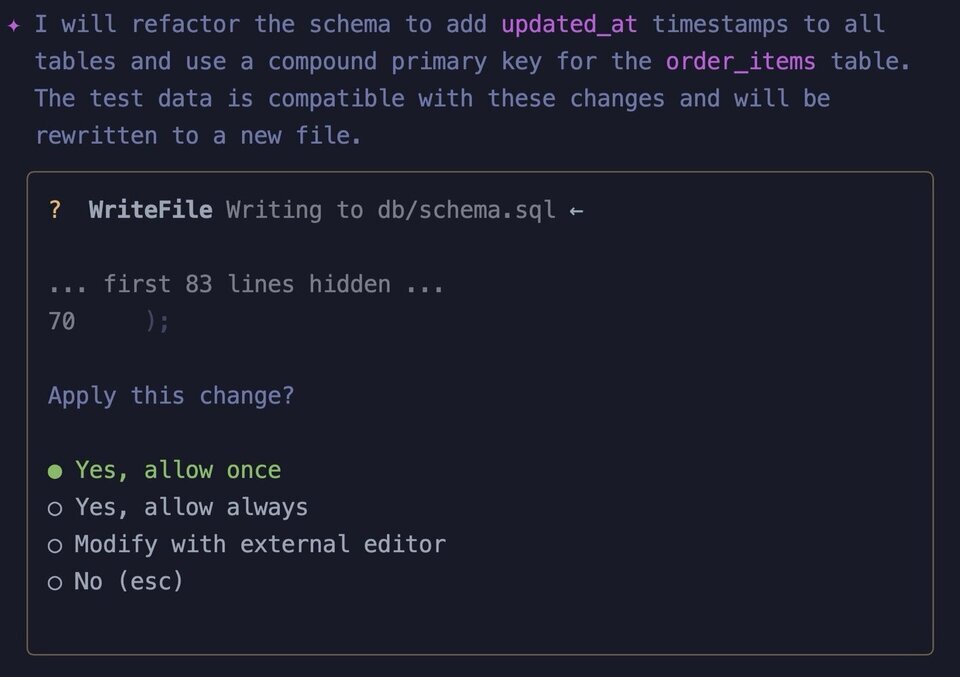
It would be nice to review the changes here in the editor, but we can see by the answer above that Gemini is making the changes we want to see, so we can hit enter for "Yes, allow once".
There might be more we can do here, but the point of this lab is to show how you're never locked in to an answer, and can change things by updating instructions and refactoring things as needed.
This worked out pretty well:
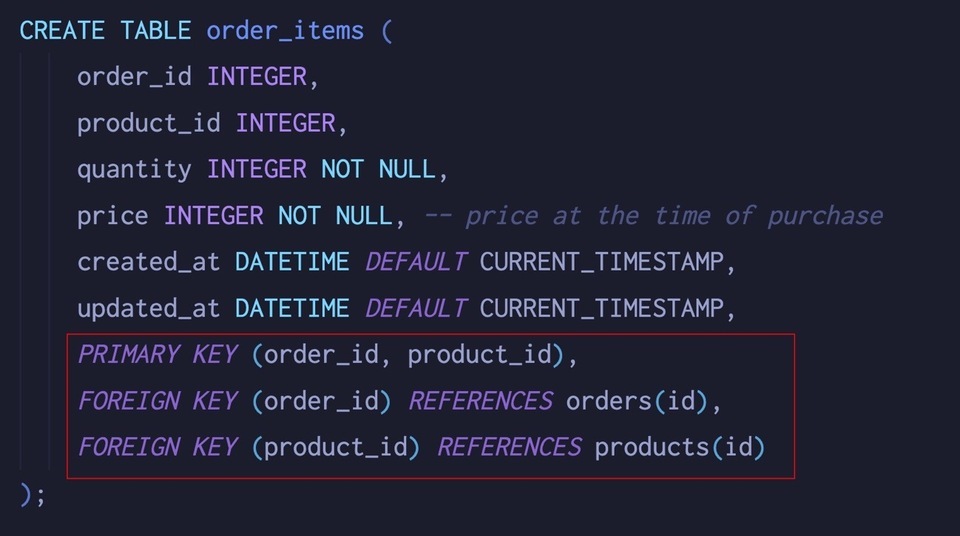
Now we can tell Gemini to reload the database for us:
drop and reload @db/red4.db
You'll go through the same process as above, but first you'll be asked to rm db/red4.db. Step through the rest of the prompts to reload the database and have a look at the new data.
Extra Credit
See if you can keep going with things here. Maybe you use MySQL or SQLServer? Have Gemini reformat the SQL so it's compatible. If you prefer GUID keys or varchar data types, add that too.
If you really want to go wild, update the spec with more tables and have Gemini redo everything.
Coding Standards
Everyone has a particular way they like to see code written. If you use C# every day, you will likely have a very strong opinion about this code:
<span class="hljs-keyword">public</span> <span class="hljs-keyword">class</span> <span class="hljs-title">Vehicle</span> {

	<span class="hljs-built_in">string</span> _color;
	<span class="hljs-built_in">string</span> _make;
	<span class="hljs-built_in">string</span> _model;

}
Opening brace on the same line, using _ to denote private fields, the use of tabs… you surely have your own way that does not overlap here.
Here's a policy that I was forced to use on a project back in 2004:
<span class="hljs-keyword">public</span> <span class="hljs-keyword">class</span> <span class="hljs-title">Vehicle</span>

	<span class="hljs-title">string</span> _<span class="hljs-title">color</span>;
	<span class="hljs-built_in">string</span> _make;
	<span class="hljs-built_in">string</span> _model;

	<span class="hljs-comment">//no naked constructors!</span>
	<span class="hljs-function"><span class="hljs-keyword">private</span> <span class="hljs-title">constructor</span>()</span>{

	}

	<span class="hljs-comment">//factory methods only</span>
	<span class="hljs-comment">//...</span>

	<span class="hljs-comment">//always override ToString()</span>
	<span class="hljs-function"><span class="hljs-keyword">public</span> <span class="hljs-keyword">override</span> <span class="hljs-built_in">string</span> <span class="hljs-title">ToString</span>()</span>{

	}
}
Every senior dev has their particulars, which is where coding standards come in.
Since we're using JavaScript, you can tell Gemini all about your preferences by adding the following to GEMINI.md:
<span class="hljs-section">## Javascript Style Guide</span>
This project uses JavaScript with the following styles:
<span class="hljs-bullet"> -</span> All models will be classes with singular naming (i.e. <span class="hljs-code">`User`</span> for the <span class="hljs-code">`users`</span> table)
<span class="hljs-bullet"> -</span> All code files will be lower case with underscores.
<span class="hljs-bullet"> -</span> Markdown files will be lower case with hyphens.
<span class="hljs-bullet"> -</span> All application logic will go in the <span class="hljs-code">`lib`</span> directory. Gemini should NEVER generate the code for logic or services. Only COMMENTS as to what should go where.
<span class="hljs-bullet"> -</span> All database-related stuff will go in the <span class="hljs-code">`db`</span> directory (models, schema, SQLite files)
<span class="hljs-bullet"> -</span> All configuration will be done with environment variables, using a <span class="hljs-code">`.env`</span> file.
<span class="hljs-bullet"> -</span> Do not export a class directly, use module method instead to create the instance you need (aka "factory")
Here's a fun tip: notice the fourth item in the list? It's telling Gemini to "NEVER" (caps work well for emphasis) generate logic or services. This can be extremely helpful in order to avoid "crap code". LLMs are very good at boilerplate, which is the stuff that we, as programmers, don't like to write. When it comes to logic, however, it might take a few tries to get it right.
But that's where the fun is! Writing this kind of thing is why you're a programmer - to solve your client's or company's problems. In this case, the LLM will add comments where it thinks the logic should go, and no more.
Your style will no doubt be different than this, but feel free to add or change what you like.
Tip: Don't know what to use? Ask Gemini…
You might have opinions on what good code looks like, but is that what other people think good code looks like? You can get a head start by asking Gemini what an idiomatic JavaScript developer might use:
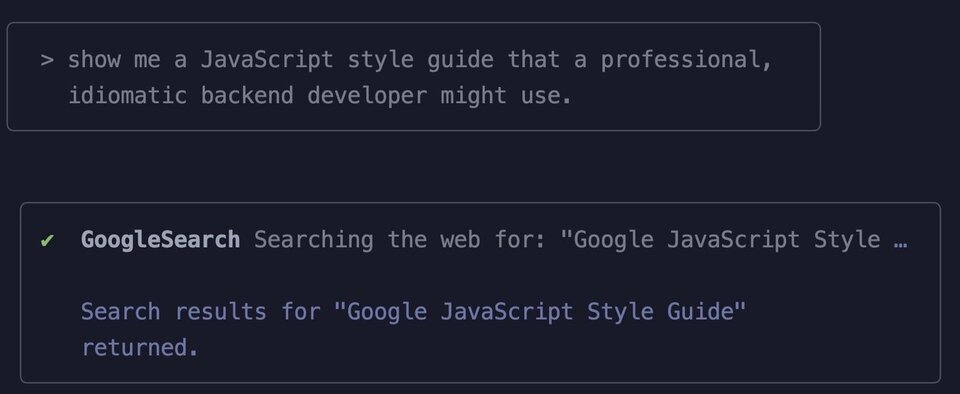
Notice how I'm framing the request? I don't want corporate guidance, or even something from Mozilla Developer Network. I want what a professional, idiomatic developer might use.
Next: notice that Gemini did a Google search? This is unique to Gemini CLI, and pretty useful!
Let's see what Gemini recommends:
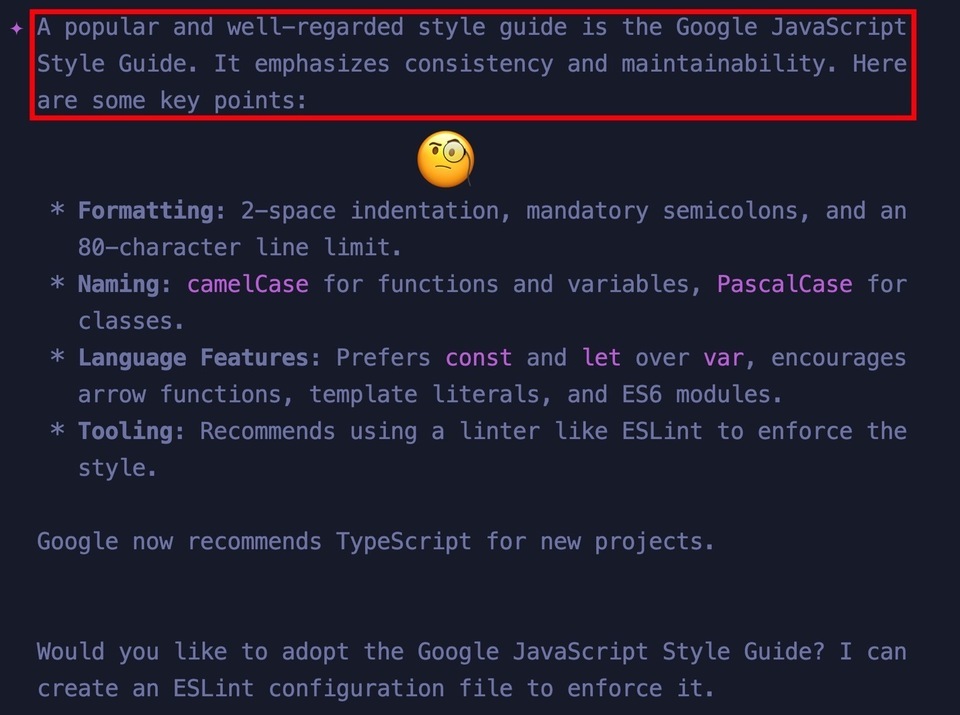
The summary is extremely helpful and we could go with this if we wanted. Do you agree with this? If not - explore!
Testing Standards
The final thing we'll want to add to our instructions are testing guidelines. Every LLM likes to create tests to go along with generated code, so you'll want to be sure you have guidelines in there so you don't end up with a mess.
Here's a sample you can use to get started. As always, add or remove what you feel is correct for you and your situation:
<span class="hljs-section">## Tests</span>
All tests will be run with Jest. In addition:
<span class="hljs-bullet">-</span> One assertion per test, <span class="hljs-emphasis">_no_</span> exceptions
<span class="hljs-bullet">-</span> Tests should arrange the test data in <span class="hljs-code">`beforeAll`</span> blocks
<span class="hljs-bullet">-</span> <span class="hljs-code">`describe`</span> blocks should have long descriptive names.
<span class="hljs-bullet">-</span> Tests should have long, descriptive names: <span class="hljs-code">`this is a test name`</span>.
<span class="hljs-bullet">-</span> The word "should" will be avoided in test names. A test either passes or fail, it <span class="hljs-code">`is`</span>, <span class="hljs-code">`is not`</span>, <span class="hljs-code">`does`</span>, or <span class="hljs-code">`does not`</span>. There is no try.
<span class="hljs-bullet">-</span> Tests will be nested, with the outer <span class="hljs-code">`describe`</span> block indicating the main test feature, and the first inner <span class="hljs-code">`describe`</span> block being the "happy path" - which is what happens when everything works as expected. The rest of the nested blocks will be devoted to "sad path" tests, with bad data, null values, and any other unexpected settings we can think of.
Use this exact pattern:
<span class="hljs-code">```js
import { someMethod } from "./some_service.js";
//The happy path, when everything works
describe("The thing I'm trying to test", () => {
//arrange
let testThing;
beforeAll(async () => {
testThing = await someMethod();
});
//act
it("will initialize", async () => {
//make sure the testThing initializes properly
//assert
expect(testThing).toBeDefined();
});
//rest of tests go down here
});
//The sad path, with error conditions
describe("The things I'm trying to avoid", () => {
describe("Error conditions with initialization", () => {
//act
it("will throw an X type error with message Y", async () => {
expect(someMethod(badData)).toThrowError("Some message");
});
});
describe("Another set of error conditions", () => {
//act
it("will throw an X type error with message Y", async () => {
expect(someMethod(badData)).toThrowError("Some message");
});
});
//rest of tests go down here
});</span>
This is an interesting set of instructions. At the top I have a style guide, but then down below I have an actual pattern. It turns out that LLMs are very good at using templates like this, and I have had some great results.
This, of course, is for JavaScript but you can ask Gemini to translate this to Python, C#, or whatever language you're using. The block style here is derived from my experience over the years and it's what I like to use.
What do you like to use? As you can tell, this entire workshop is about exploration and seeing what's possible, so add your own changes here and ask Gemini (or Copilot) some questions!
Be sure to GEMINI.md with whatever styles suit you because we'll be using it in the next session.
Summary and Discussion
We're fine-tuning our AI responses while at the same time using instructions to write smaller prompts. This is where efficiency really takes off, and we start to see replies from Gemini (or Copilot) become extremely useful.
Here are some discussion points to raise with the rest of the group, or your instructor:
- What other things could go in the instructions file that would decrease crap code and increase efficiency?
- Do you feel you have more control now over the experience, or less? The LLM knows a lot more, so needs less input from you.
In the next lab we'll wrap things up with a full run, creating a data access layer we can be proud of.
A focused workshop for working developers who need to use AI right now, in real projects, under real time pressure.