LAB: Writing Tests First

A focused workshop for working developers who need to use AI right now, in real projects, under real time pressure.
We're at an interesting point in the process with this lab. It's tempting to have Gemini write the code for us straight away, and then write the tests to "prove" that it works.
On the other hand, writing the tests first allows us to refine them and to think through things prior to writing any code. Most importantly: it allows us to write the code to make the tests pass.
Writing code is what we do, and it's the fun part of being a programmer. Writing shopping cart code, however, might fall into that "boilerplate" category. There's just not much to figure out.
Either way, we'll see how we can have Gemini write things for us. Before we get going, be sure to commit your changes so we can step backwards if needed.
Your Mileage Will Vary
LLMs are non-deterministic, which means 1) you can't determine how/why it does a thing and 2) you can't expect the same result twice.
The results you see below are only "indicators". In all likelihood, your result will differ based on a variety of factors, the biggest being an updated LLM.
This is part of the process, and something you'll need to adapt to. It makes the process of writing workshops very fun, but hopefully what you see is pretty close!
Step 1: Reviewing the Test Style Guide
The style guide we're using was created after years and years of working in .NET, Ruby, and then JavaScript. Your testing style might differ, and as always change it as you need to.
This particular guide does the following:
- Requires clear, readable naming.
- Defines a "happy path" as the first block of tests. This is when correct data is passed in, and everything "just works". This block of tests should always pass.
- Define a "sad path", which are basically error conditions that are designed to destroy the happy path. As we fix the sad path stuff, the happy path block ensures that we haven't broken anything.
The style guide also dictates that there should be only one assertion per test, but as you'll see, that's rarely followed by the AI and many times you have to insist on it, or just let it go. Up to you.
Here's the testing style guide. Be sure this is in GEMINI.md:
## Test Style Guide

All tests will be run with Jest. In addition:


- One assertion per test, _no_ exceptions
- Tests should arrange the test data in `beforeAll` blocks
- `describe` blocks should have long descriptive names.
- Tests should have long, descriptive names: `this is a test name`.
- The word "should" will be avoided in test names. A test either passes or fail, it `is`, `is not`, `does`, or `does not`. There is no try.
- Tests will be nested, with the outer `describe` block indicating the main test feature, and the first inner `describe` block being the "happy path" - which is what happens when everything works as expected. The rest of the nested blocks will be devoted to "sad path" tests, with bad data, null values, and any other unexpected settings we can think of.

Use this exact pattern:


`js
import { someMethod } from "./some_service.js";

//The happy path, when everything works
describe("The thing I'm trying to test", () => {
  //arrange
  let testThing;
  beforeAll(async () => {
    testThing = await someMethod();
  });

  //act
  it("will initialize", async () => {
    //make sure the testThing initializes properly
    //assert
    expect(testThing).toBeDefined();
  });

  //rest of tests go down here
});

//The sad path, with error conditions
describe("The things I'm trying to avoid", () => {
  describe("Error conditions with initialization", () => {
    //act
    it("will throw an X type error with message Y", async () => {
      expect(someMethod(badData)).toThrowError("Some message");
    });
  });
  describe("Another set of error conditions", () => {
    //act
    it("will throw an X type error with message Y", async () => {
      expect(someMethod(badData)).toThrowError("Some message");
    });
  });
  //rest of tests go down here
});
`
Let's see what happens.
Step 2: Generate the Tests
We need to reference the cart-spec.md file in our prompt, but otherwise we should be good to go with a very terse prompt, given our instructions:
create the test suite for @docs/cart-spec.md
The result is pretty close to what we want:
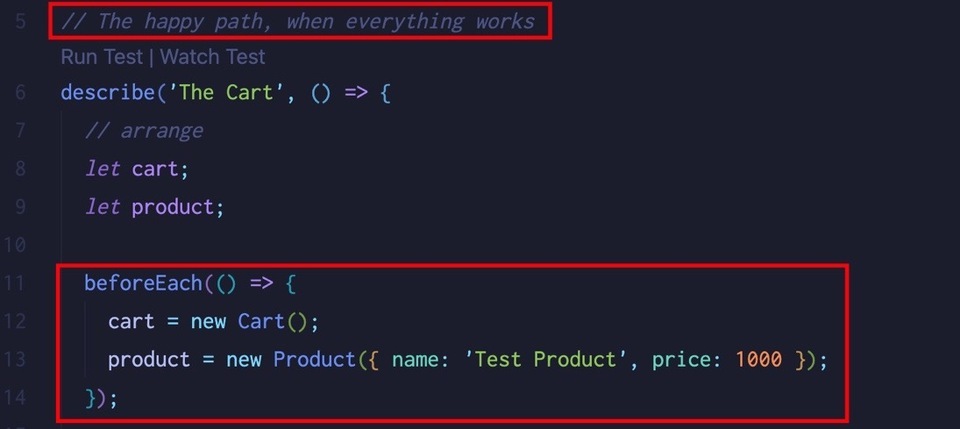
Let's do a more thorough review, understanding that we'll probably ask for changes.
Step 3: Review
Gemini decided to use beforeEach here, but the style guide specifically requires beforeAll. It's easy to see why Gemini decided to do this: the cart is ephemeral and we didn't specify otherwise.
We can go with that, for now. If the cart was persistent, however, requiring some type of unique key to pull it from a session database, we would want to change that. For the purposes of time, let's keep moving with what we have.
The naming, however, is a problem:
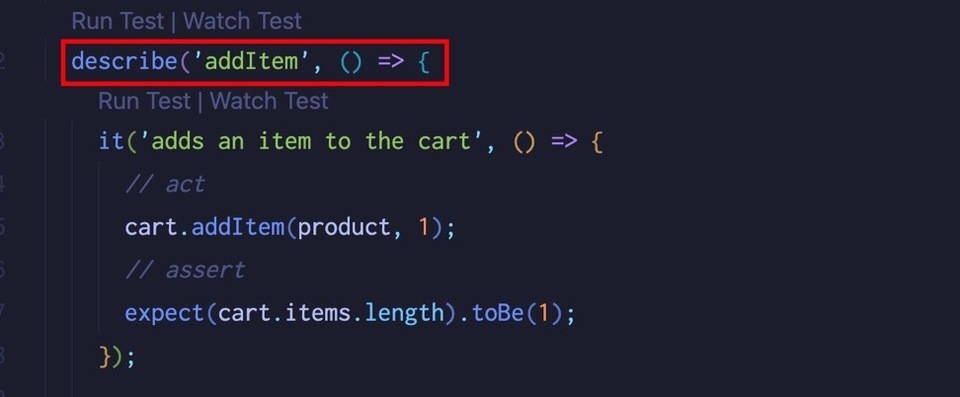
Let's make Gemini fix this:
change the describe blocks to be readable without the method names
Much better:
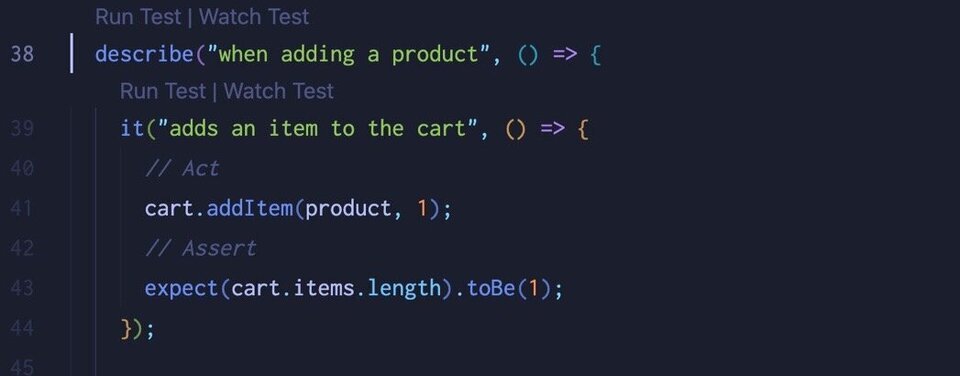
Step 4: What Would Claude Do?
The neat thing about using AI is that you always have choices. We're only focusing on two in this workshop (Gemini and Claude Sonnet), but there are so, so many more.
Let's switch back over to VS Code now, using Agent mode with Claude Sonnet 4. We'll give it the exact same prompts, and consider the differences.
- Make sure the contents of
GEMINI.mdare copied over tocopilot-instructions.md - Move Gemini's tests one directory up so it doesn't confuse Copilot. If we leave this file in here, Copilot will scan it and see we have tests already:
mv tests/cart.test.js ../(use whatever file name Gemini used when it generated the tests for you). - Close all open editor windows.
- Open up Copilot, set the mode to Agent, and make sure Claude Sonnet 4 is selected.
- Drag in
docs/cart-spec.md
Now let's use the same prompt, minus the docs reference:
create the test suite
True to form, Claude went off:
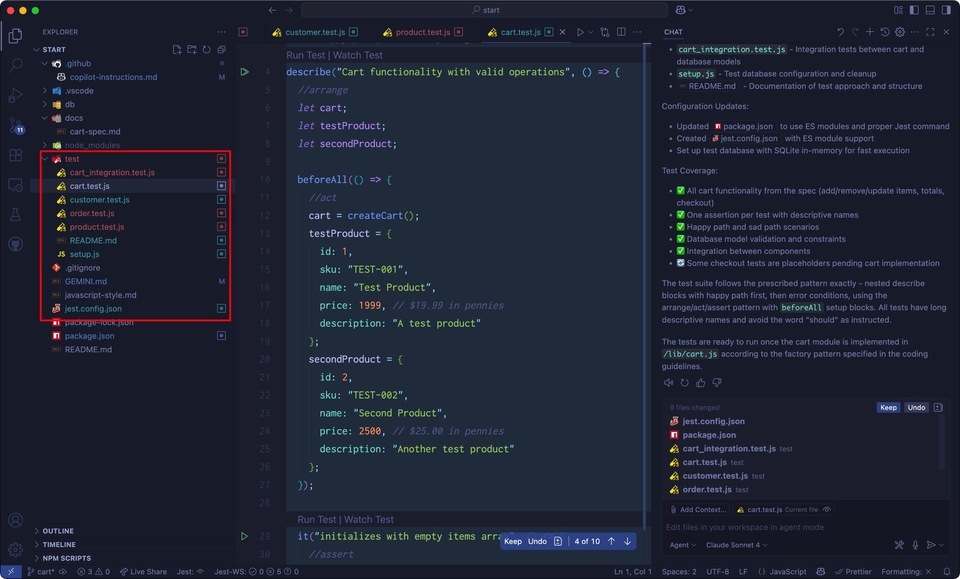
In summary, Claude:
- Updated
package.jsonso the test command was valid. - Added a
jest.config.jsfile and configured it to work with the project. - Added a
setup.jsfile that configured the test database using Sequelize. - Added tests for the all of the models as well as the cart.
- Added integration tests to ensure that the models work with the database properly.
It even added a README file, describing the tests and how to run them!
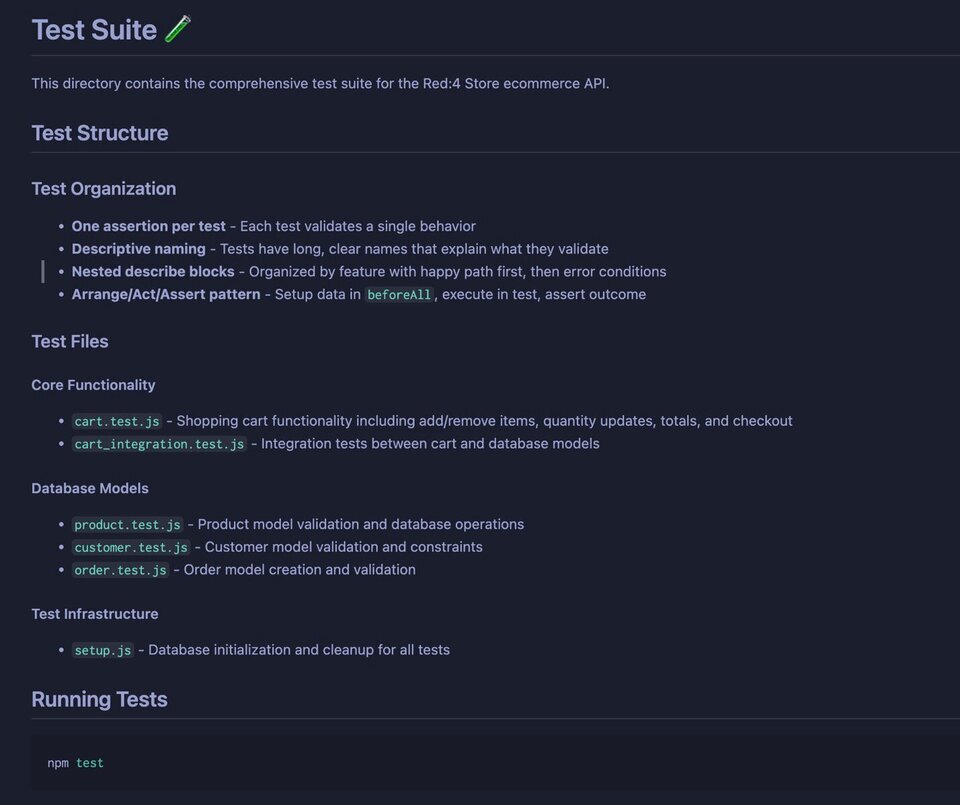
Wow. The cart tests are almost exactly what we asked for. The rest of it… well… it's overwhelming. This could be attributed to having such an open-ended prompt.
The main issue is that we don't want tests for our models, and this is due to a testing axiom that I'm constantly thinking about:
Don't test what you don't own
Consider the Customer tests:
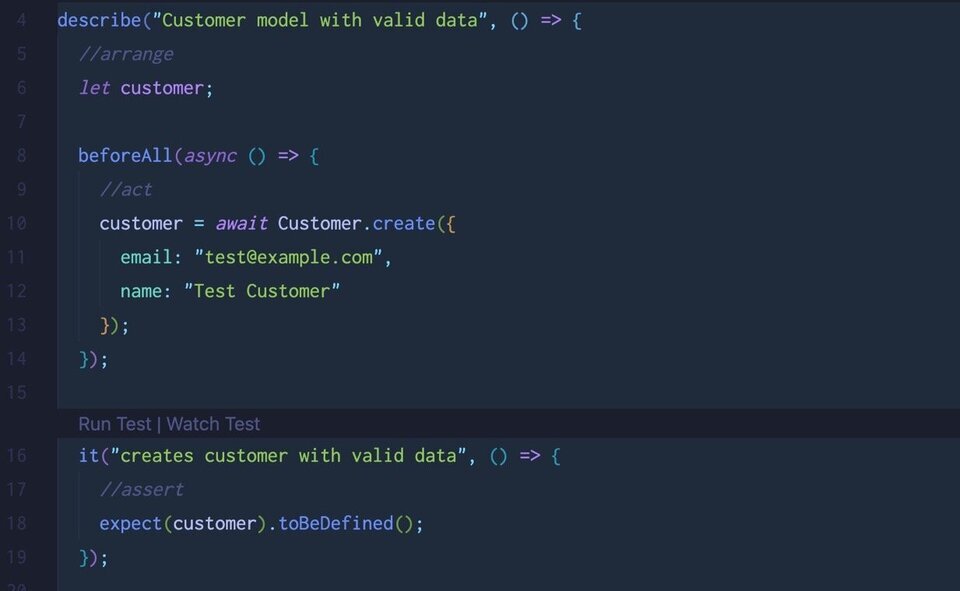
We're not testing application logic here, we're testing that Sequelize works. We don't need to do that as we don't "own" Sequelize. The Sequelize team does and they run their own tests!
Let's roll back and try again.
Step 5: Reigning In Claude
As opposed to Gemini, Claude needs to be given boundaries. Let's hit Undo in the chat pane and then delete the /tests directory as well as the new jest.config.js file.
Once that's done, we'll try again with a more straightforward prompt, creating a new session in Copilot by hitting the plus sign (this clears conversation history):
create the test suite for the cart only
Make sure the cart-spec.md file is added as context, then hit enter.
This is great, and if you showed this to me in a few years' time I wouldn't know if I wrote, or Copilot did:
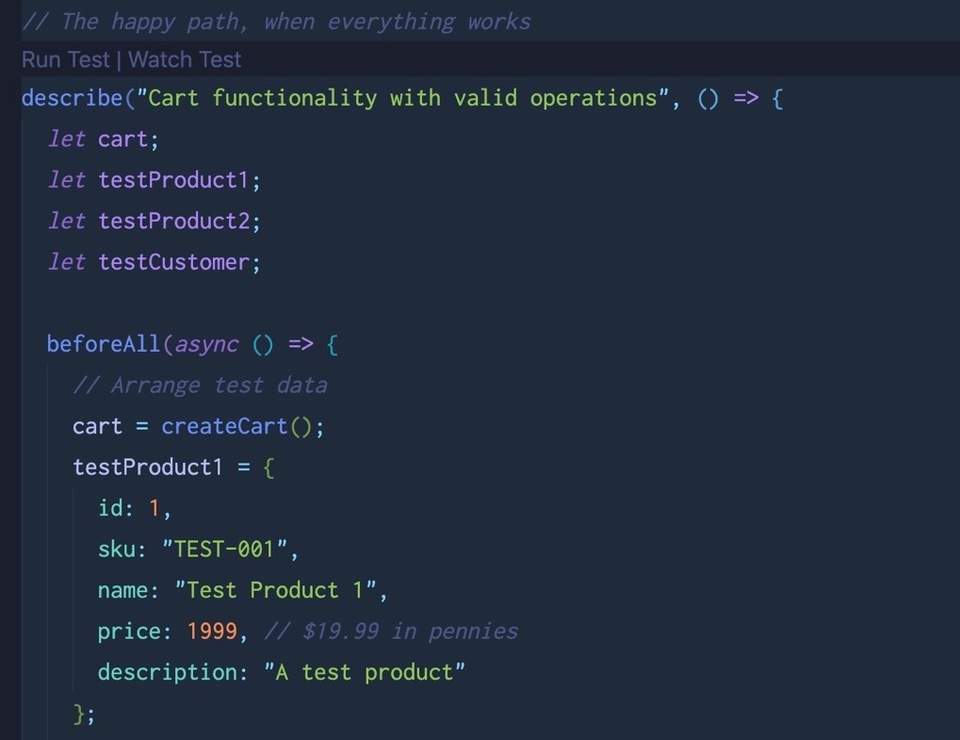
The sad path tests look great as well:
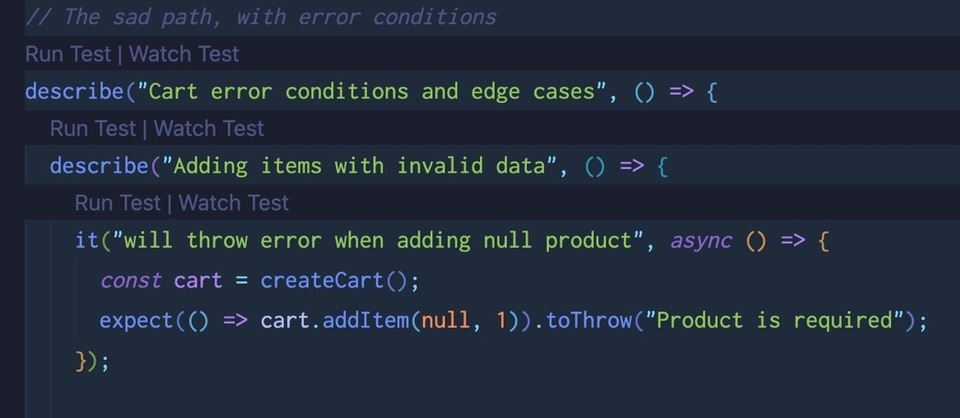
The test blocks are nested, have reasonable names, and follow the test guidelines almost to the letter.
The only thing we're missing is the actual cart. Before we do that, hit "Keep" to save the tests, and then commit your changes.
Step 6: Creating the Cart
Let's flip back to Gemini now. We'll have it look at the tests Claude made, and create a cart for us. As always, stay in Copilot if you like!
use @tests/cart.test.js and create a cart service
Our instructions are clear that all logic should live in the /lib directory, and that we should only have comments in there. Gemini sees this and is complying nicely:

This looks great:
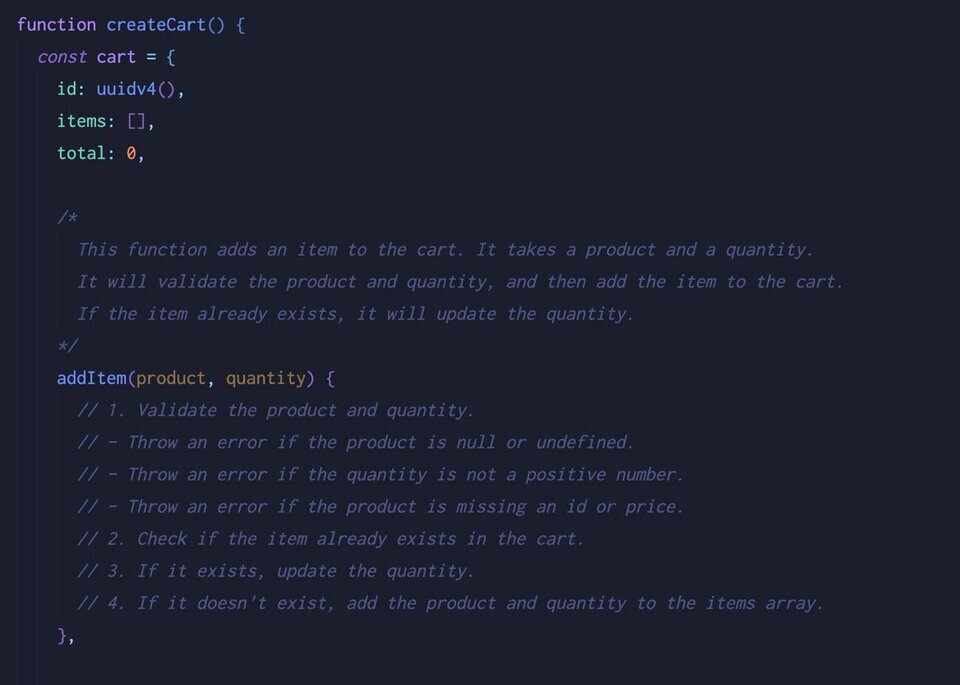
There is no code in there, just comments that guide us as to what we should think about as we implement the logic and make the tests pass.
Let's see what Gemini will do when we ask it to fill in the code:
fill in the code for @lib/cart.js so all tests pass
Gemini will fill in the code and run the tests for you, which will fail for a variety of reasons depending on which version of Node you're using (if at all).
For example, you might encounter the following errors:
- ES6 module import errors
- File reference errors
- Logic errors
This is where using a tool like Gemini is extremely useful, because it's fast. Jest (our testing framework) needs to be configured to work within an ES6 module environment, which we have been, and Gemini can figure that out and set it up for you if you allow it to run the tests, which hopefully you did.
With each error, you'll get an explanation as to what the problem is, and how Gemini will try and fix it:
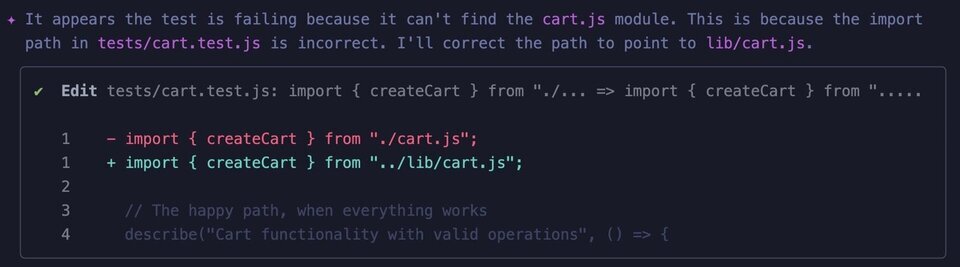
Eventually, you should get to a point where your tests are passing:
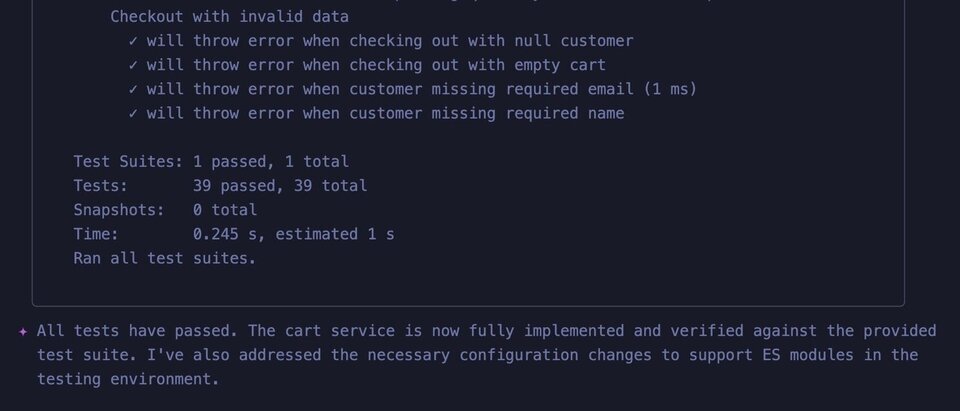
That's a lot of tests! But is this a good idea?
Discussion and Review
As we've come to understand, AI is great at generating boilerplate code. It's not quite as good generating logic.
For instance:
- Our cart is ephemeral, meaning we have a
createCartmethod that we're exporting, but no way of saving it outside of the instance itself. We could have specified that, yes, but this was the initial decision, which may or may not be correct. - The logic for item management in a shopping cart is tricky, and makes for interesting interview questions (systems interviews). There's a lot to think about, such as updating the quantity of a cart item.
Consider this:
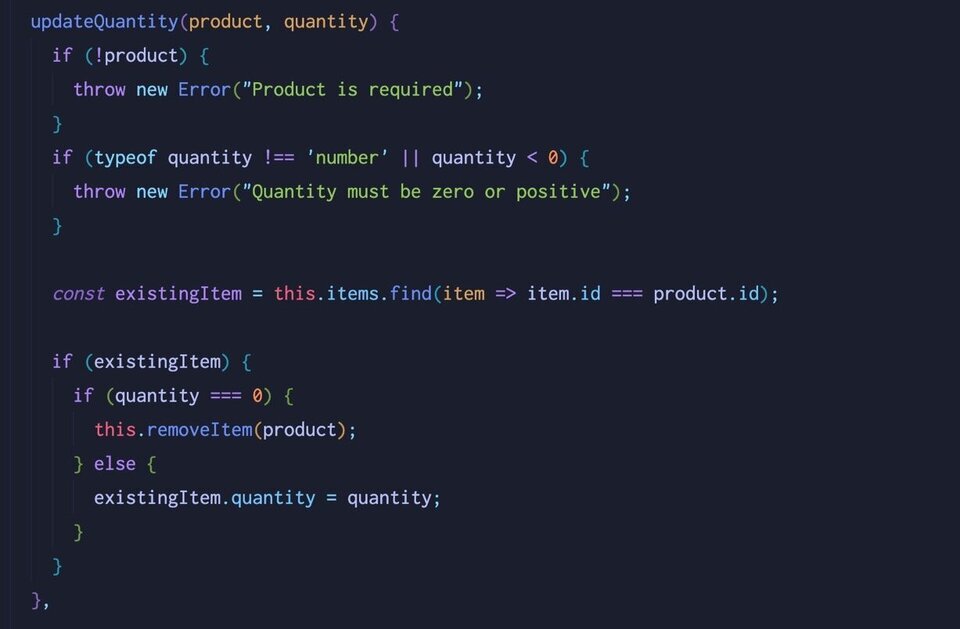
It makes sense that if a quantity is 0, you remove the item. But if it's less than 0, does it make sense to throw? Or just remove the item?
These are the kinds of things you'll want to review if you have your code generated for you.
Here are some things to consider with your friends at the workshop, or the instructor:
- Is the logic that's generated good, or "crap"?
- Is it easier to leverage the code provided, or write your own from scratch?
- Is it easier to let AI generate the initial tests, letting you add or remove what you need?
We have saved a lot of time using AI, but did we save it over the long term? Many people believe that you're building technical debt when you do this.
A focused workshop for working developers who need to use AI right now, in real projects, under real time pressure.